Welcome to Technical Kirukkan

Free Downloads,Mobile Stuff, PC Stuff, Downloads, Technology Reviews ans Stuff and alot you can get here.

Need Help on Troubleshooting PC's

We are ready to help you for any Repair or Troubleshoot your PC for free, just send a mail to techkirukkan@live.com for Tech Support .

Android, Symbain, Java, Anna OS Support for Mobiles

You can find here for any OS Updates, New Application Launches in Android Market,and other Java,SIS updates with Tech support for your Mobile Repairs and Upgrades.

Get Aware and Live Easy with Technology

Unlimited Free Tech Support for your Devices ,mail us at techkirukkan@live.com.

Tweet

My Blog List

Total Pageviews

Showing posts with label Android. Show all posts

Thursday, April 5, 2012

துல்லியமான திரைகளை கொண்ட SH-06D ஸ்மார்ட் செல்பேசிகள்


ஐபோன்களுக்கு அடுத்தபடியாக முன்நிலையில் காணப்படும் ஸ்மார்ட் போன்களில் மேலும் ஒரு புதிய கைப்பேசி அறிமுகமாகியுள்ளது.SH-06D என்ற பெயருடன் வெளியிடப்பட்டிருக்கும் இந்த கைப்பேசியின் திரைகள் மிகத்துல்லியமாக படங்களை காட்டக்கூடியன.


இவை அன்ரோயிட் 2.3 இயங்குதளத்தின் அடிப்படையில் செயற்படுவதுடன் தொடுதிரை வசதியையும் கொண்டுள்ளன.அத்துடன் வழமையான கைப்பேசிகளின் icons, widgets, wallpaper போன்றவற்றிலிருந்து முற்றிலும் வேறுபட்ட அமைப்புக்களை உள்ளடக்கியுள்ளது.

இக்கைப்பேசியின் திரையானது 4.5 அங்குல அளவுடையதும், உயர் பிரிதிறனை உடையதுமான 3D MAGI display ஐக் கொண்டுள்ளது.மேலும் 1.2GHz dual-core புரோசசர், 512MB பிரதான நினைவகம் ஆகிய அம்சங்களை கொண்டுள்ளது.

Wednesday, March 14, 2012

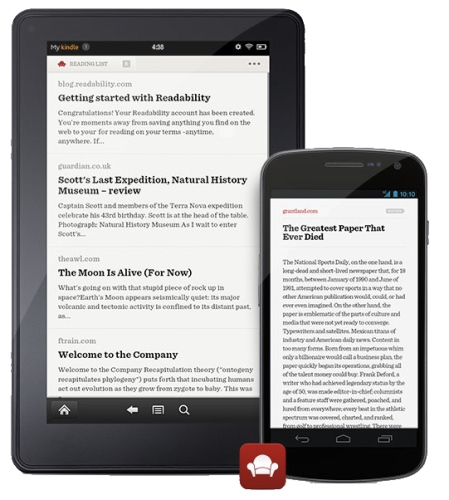
Readability app now available for Android


Readability app is now available for Android. It is a reading app that turns web pages into a clean, elegant, single-column reading view stripping out the formatting. This also lets you store and share an article. The app is already available for Kindle e-readers and recently launched for Apple iPhone and iPad.

Features of Readability app for Android

View Web pages in a clean, elegant, single-column reading view.
Save any Web page to Readability and it automatically saves on your Android device that is available offline once it is synced.

Customize the reading view by adjusting type size, text style, and contrast to your liking.
Archive the article just by tapping it after reading it that that is searchable and also syncs on the Web
Share your favorite articles along with your own comments on Facebook, Twitter, or by e-mail to your friends.

You can go to Readability website using your favorite browser and install the free Readability add-on to save the articles to read using the app. You can even add articles to your Reading List by e-mail. Just copy and paste up to 20 URLs and send it to personalized address, provided free by Readability.

Download Readability app for Android from the Google Play Store for free.

Monday, March 12, 2012

How to Send and Receive files via Bluetooth on iPhone,iPod and iPad

How to Send and Receive Files in iPhone, iPod and iPad through Bluetooth

Apple iPhone is my Favorite phone I ever used. Most of the times when i am with my friends,  they used to show me interesting stuffs in their phones like Pictures, Videos or Music. When they interested to send that file to my iPhone, i really disappointed to say “I DON’T HAVE THAT FEATURE”. Not only me all  iPhone owners are really disappointed due to the restriction by sending and receiving files such as Photos, Videos, Music, Etc through Bluetooth. Apple Restricted this due to the security reasons. But Today we have a solution to bypass this issue.  You can able to send to all Mobile Models, Mac and PC. All you need Jailbroken iPhone, iPad or iPod Touch before proceeding to this step.
Note: This is only for Jailbroken iDevices.
bluetooth-file-sharing-iphone-4s
All you need to install a simple App from Cydia named “AIRBLUE SHARING” which allows you to send and receive file from any Mobile models, MAC and PC through Bluetooth. If you want to send and receive file between iDevices, it will use WIFI transfer to make it faster. It works perfectly.
First you have to Go to Cydia and Search for “AIRBLUE SHARING

Airblue sharing

This Tweak package cost $4.99 in Cydia. Purchase it, Worth for Money.

How to Activate the AirBlue Sharing?

Before Start Receiving, First Activate the Application. Just Go to photos or Music and Send any files. It will ask you to Activate. Click ACTIVATE and it is Done.

How it Works?

After Installing the Tweak, Reboot the Device and its now ready to Receive and Send Files. If you want to Receive Files, Just Double tap on status bar.  AirBlue Sharing will listen for incoming file transfers in 120 seconds.Even You can change the configuration in Settings of AIRBLUE SHARING and You can see Bluetooth option in Photos, Music and Videos in your iPhone. So you can just Choose Bluetooth and Start Sharing with your friends.

Airblue sharing 

In iOS 5 and Above all your files will be saved in VAR/MOBILE/AirReceived (can be accessed though iFile). If you are using below iOS 5 it will be saved in respective places like Musics and Videos in iPOD, Images in Photos and Vcard in Contacts.
If you want to check the Process of Trasferring, just Double tap on the Status Bar (Can be Configured under settings) to know the Process.

Monday, February 27, 2012

Astrid Task/To-do List for Android Devices

The best part of the calendar app is the ease of use and the ability to send alerts as SMS
One of the things we have been told to lead an organised life is to ‘have a diary' with us. There are two ways of using a diary. One is to write out our thoughts and also what we did each day, so that at some point of time, we can analyse our actions.
There is another and more important aspect of having a diary — keeping track of appointments and things to do. Carrying a diary around is a great habit, but when everything is becoming digital, why not the humble diary?

Drawback

In the digital world, any calendar programme in your desktop computer or the ones that come with e-mail programmes such as Outlook or Thunderbird can help you get organised. They can even alert you at the set time. The biggest drawback of this is that the computer has to be on at the time and also, you cannot be always in front of your computer.
 Here, you can use a mix of some cloud-based programmes and your mobile to get reminded whenever your appointment or ‘to do' is due.
The best and one of the oldest (that has been written about a lot) is the Google / Gmail calendar.
The best part of the calendar app is the ease of use and the ability to send alerts as SMS. Getting the alert as an SMS means you don't need a smartphone to receive the alerts. Even the lowest-priced phone is enough.
If you have a Google account, you have to login to the calendar (http://calendar.google.com). Or if you don't like typing big URLs, you can log in to any Google account (Gmail, Picasa and the like) and click the Calendar tab.
Creating an appointment cannot be made easier. Clicking on the date will open up a small box where you can enter something like ‘8 a.m. Meet Joseph'. The calendar will automatically create an entry at 8 a.m. on that date.

Alert

The alert will be delivered on time on your mobile. You can also edit the appointment to tell the calendar when you have to be alerted.
Of course, you have to set the mobile number in the calendar settings. The alerts will also be sent to the e-mail address you specify.
This is not restricted only to Google. Similar functionalities are available across all platforms such as Yahoo, Windows Live (Hotmail) and Apple. If you have a smartphone, these calendars sync to the phone and you get pop-ups at the scheduled time.
Even if you don't have a smartphone, you can still use your low-end phone's calendar to schedule reminders. The only issue is that the calendar in low-end phones may not be very user-friendly, and keying in multiple reminders or appointments can be a painful affair, but you can still get alerts.

Calendar apps

But, these calendar apps won't help if you have multiple things to do. For that there are task managers where you can add several tasks and clear them one by one when you complete them.
There are ‘To do' managers available across all platforms — with cloud-device sync. Most of the phones have them, but again, if you have a lot ‘to do', you will be spending most of your day keying in the ‘to dos'.
Gmail has its own task manager for mobiles (mail.google.com/tasks), for which, obviously, you will need a browser. If you want more functionality, again, as always, you have apps at your service. 

Android market has, as usual, the most number of apps. Each app comes with its own features, but many of them have one feature that makes things easier — syncing with Google Tasks. That way, whatever tasks you key in gets automatically synchronised with Google Tasks. If you want to directly access Google Task, there are apps for that too. If all the apps do the same thing, how does the market support multiple apps? Most of them differ in the ease of use and user interface. There are some that come with widget functionality so that the tasks are visible on the phone screen itself, without you having to open the task app every time. Many of them also alert you through the notification screen.

Task apps

One thing you will have to remember while downloading the task apps is that there are other apps that are also called ‘task managers' that have a totally different function — to manage the apps running in the phone. You have to ensure you download a ‘To Do' app instead of an app manager.
Talking of USP, one of the most popular apps in the Android market is Astrid. While it has the Google Task sync function, you can also collaborate with your friends and have combined tasks. It also has a beautiful calendar interface. 

If your computer has Microsoft's One Note installed, you can make it a functional task manager that can sync with almost all your smart devices. One Note has apps for all major platforms such as Windows Phone, iPhone and Android. Even if you have devices in different platforms, you can sync your One Note to all the devices. 

Can they replace your good old diary? Yes, putting it on paper has its own advantages — it doesn't crash, the data doesn't get deleted by mistake and you don't have to worry about accounts, passwords and platform compatibility. But with sheer convenience, digital diaries and To Do managers do make our lives much easier.

Saturday, February 11, 2012

HTC Sensation phones Android Update

HTC Sensation phones to get Android 4.0 update starting March 2012, adds more supported devices


HTC has announced that the Android 4.0 (Ice Cream Sandwich) update to roll out starting end of March 2012 starting with Sensation devices. The first devices to get the update includes, HTC Sensation, HTC Sensation 4G and HTC Sensation XE, followed by the HTC Sensation XL. They confirmed the list of devices that would get the update last November.

HTC has also added new devices that would get the Android 4.0 update as they said. The list of phones include,

    * HTC Incredible S
    * HTC Desire S
    * HTC Desire HD

Other than these phones the HTC Rezound, HTC Vivid, HTC EVO 3D, HTC Amaze 4G and HTC EVO Design 4G (through carrier partners) would also get the update as they announced previously.

Thursday, February 9, 2012

Best QWERTY Android Phones in India – November Price List

The QWERTY full keypad layout phone was introduced to provide fast and efficient typing speed. The Android operating system when embedded with such phones made the possible so called ‘touch and type phones’ and here we present the best QWERTY layout phones available in India updated as of November 1, 2011.


HTC Chacha
If you talk of one phone which is hit and talk of the town among the QWERTY layout phone is HTC Chacha. With HTC Sense user interface, the HTC Chacha touch and type combines the 2.6 inches capacitive touchscreen display with QWERTY layout keypad. It runs on the Android 2.3 Gingerbread OS and it has 800 MHz processor with 512 MB of RAM to run all of your applications smoothly. I would say HTC Chacha is the ideal QWERTY + Android phone.
HTC ChaChaThe specifications of HTC Chacha are –
  • Android 2.3 Gingerbread OS
  • 2.6 inches HVGA touchscreen display with 480 x 320 pixels
  • 5 mega pixel camera
  • 0.3 mega pixel secondary camera
  • 800 Mhz processor
  • Expandable up to 32 GB in size
  • Dedicated Facebook button
  • A GPS antenna
  • Li ion 1250 mAh battery with 6 hours of talk time
  • Wi-Fi 802.11 b/g/n
  • Wi-Fi hotspot, micro USB
HTC Chacha is priced at Rs 15,000.


Motorola Charm MB502
All charming Motorola Charm MB 502 is all in try out mobile phone with Android 2.1 OS, 2.8 inches TFT touchscreen display with 3 mega pixel camera and QWERTY layout. This turns to be a good business phone with QWERTY layout keypad and competitor of Samsung Galaxy Pro.
Motorola CharmThe following are the feature of Motorola Charm MB 502 mobile phone –
  • Android 2.1 Eclair OS
  • 2.8 inches capacitive touchscreen display
  • 3 mega pixel camera
  • QWERTY layout keypad
  • 3G network support
  • Wi-Fi support
  • Expandable up to 32 GB
Motorola Charm MB 502 is priced at Rs 6999.


Sony Ericsson Xperia X10 Mini Pro
The Sony Ericsson Xperia X10 Mini Pro is an Android powered mobile phone continuing the Xperia family. It’s a slider GSM phone with QWERTY layout keypad. The outstanding feature of this mobile phone is 5 mega pixel camera and the Walkman included in the phone as always with the Sony Ericsson mobile phones.
The following are the specifications of Xperia X10 Mini Pro mobile phone –
  • Android 2.2 Froyo OS, upgradeable to higher versions
  • 2.5 inches capacitive touchscreen display
  • 5 mega pixel camera
  • 600 MHz ARM11 processor
  • 2G and 3G network support
  • Wi-Fi supported
  • 32 GB microSD card support
Sony Ericsson Xperia 10 Mini Pro is priced at Rs 9700 in India.


LG Optimus Pro C660
LG Optimus is lone phone in the QWERTY list from the manufacturers of LG Electronics. Its basically a full QWERTY layout phone with Android powered operating system and includes 800 Mhz Qualcomm Scorpion processor. The battery life of this phone with 1500 mAh battery is the standout features when devicesd with other mobile phone in this article.
LG Optimus Pro C660The specifications of LG Optimus Pro C660 are -
  • Android 2.3.3 Gingerbread OS
  • 2.8 inches TFT touchscreen
  • 3.15 mega pixel camera
  • 800 Mhz Scorpion processor
  • QWERTY keypad
  • Wi-Fi enabled
  • Expandable up to 32 GB in size
  • 13 hours of talk time
The LG Optimus Pro C660 is priced at Rs 9590 in India.


Motorola MileStone
The Motorola MileStone is a multi-tasking supported QWERTY Android phone with impressive 5 mega pixel camera. Motorola MileStone is just another Android mobile phone with host of features and best fitted at its price tage of Rs 13500. It’s particularly a 3G mobile phone with the impressive 3.7 inches capacitive touchscreen display with multi touch and accelerometer.
Motorola MilestoneThe specifications of Motorola MileStone is –
  • Android 2.2 Froyo OS
  • 3.7 inches capacitive touchscreen display
  • 5 mega pixel camera
  • 3G phone
  • QWERTY layout
  • Wi-Fi enabled
  • Expandable up to 32 Gb in size
  • 1400 mAh battery
The Motorola MileStone is priced at Rs 13500.

Motorola Fire
The Motorola FIRE is like a fire in the India market as Motorola bounce backs in India. Motorola looks to be in serious competition as it introduces Fire handset with Android, touchscreen and QWERTY layout keypad. The Motorola FIRE runs on Android 2.3 Gingerbread operating system and it has 2.8 inches capacitive touchscreen.
Motorola FIREIt’s a 3G phone and the specifications are main features are listed below –
  • Android 2.3 Gingerbread OS
  • 2.8 inches touchscreen display
  • 3 mega pixel camera
  • 600 MHz processor
  • QWERTY layout keypad
  • 2G and 3G network support
  • Wi-Fi enabled
  • Wi-Fi tethering
  • 32 GB expandable memory through microSD card slot
Motorola Fire is priced at Rs 9000 and it’s a must go device at that price.


Huawei Ideos Chat U8300
The Huawei Ideos Chat U8300 is a QWERTY layout based Android mobile phone with nice design and shape. Its powered with Android 2.1 Eclair OS which can be upgraded to higher version of Android and it includes a 528 Mhz processor
Huawei U8300The specifications of Huawei Ideos Chat U8300 are-
  • Android 2.1 OS
  • 2.6 inches TFT LCD Resistive touchscreen display
  • 3.2 mega pixel camera
  • 528 MHz processor
  • QWERTY layout keypad
  • Expandable up to 32 Gb in size
  • Wi-Fi
  • 3G HSDPA connectivity
The price of Huawei Ideos Chat U8300 is Rs 7100.


Samsung Galaxy Pro B7510
Samsung Galaxy Pro B7510 is a QWERTY smartphone with 2.8 inches capacitive touchscreen display. The Galaxy Pro has 800 Mhz processor with TouchWiz 3.0 interface from Samsung. Being a trusted brand Samsung Galaxy Pro didn’t get much acclaim from the users as it was expected at the launch.
Galaxy Pro with QWERTY keyboard appeas to the professionals who need keypad and at the same time they get the touchscreen feeling.
Samsung Galaxy Pro B7510The features of Galaxy Pro are –
  • Android 2.2 Froyo Operating system
  • 800 Mhz processor
  • 3 mega pixel camera
  • 2.8 inches capacitive touchscreen display
  • QWERTY keypad
  • Expandable up to 32 GB in Size
  • 6 hours of talk time
  • Wi-Fi
The Price of Samsung Galaxy Pro B7510 is Rs 10,000.


Motorola Flipout
Motorola Flipout is a standout phone with amazing slideout QWERTY layout and it has two panels. The screen panel is on the top with 2.8 inches touchscreen display and body panel with keypad is at the downside with impressive features such as 600 Mhz ARM cortex A8 processor, QWERTY full keypad layout, Wi-Fi, expandable up to 32 GB in size and lot more.
Motorola FlipOutThe features of Motorola Flipout are –
  • Android 2.1 OS
  • 2.8 inches touchscreen display
  • 3 mega pixel camera
  • 600 Mhz ARM Cortex A8 processor
  • QWERTY layout keypad
  • 2G and 3G network
  • Wi-Fi enabled
  • Expandable up to 32 Gb in size
Motorola Flipout is priced at Rs 7999 in India.
That completes the list of 9 available QWERTY layout business phones available in India. Some of the phones listed above maybe come in the list of Best Android phones below Rs 10,000 in India.